Showing posts with label R. Show all posts

Wednesday, June 21, 2017

Scrapping Tweets About Buhari, Osinbajo and Trends: How To Schedule R Scripts To Run Daily Using Windows Task Scheduler

Today (5th June, 2017), I finally got around to doing the R script that will daily mine social media data off Twitter about conversations around President Buhari, Acting President Osinbajo and whatever is trending in Nigeria twittosphere. Will keep it running to do fun or even commercial projects in and beyond 2019 (election year).


The interesting challenge there was to schedule this to run daily, saving the tweets in a CSV file incrementally.

I found two ways online -- the familiar Windows Task Scheduler way and using taskscheduleR

I already use Windows Task Scheduler for a couple of Python scripts and familiar with the setup, so I decided to go along with it.

It is straightforward to use. I have broken the entire process into two steps:

Step 1: Create a Batch file to run the R script
Create an empty text file and save it as .bat file. Then get the executable path of your R installation. Mine is C:\Program Files\Microsoft\MRO-3.3.1\bin\R.exe

Also get the path of your R script. 

Now set up the .bat file like I did mine below

@echo off
"C:\Program Files\Microsoft\MRO-3.3.1\bin\R.exe" CMD BATCH "C:\Users\Michael Olafusi\Documents\TwitterScrapper.R"


Step 2: Create the Scheduler Task
Launch the Task Scheduler (just search for it if you use Windows 10, 8 and 7).


In the Task Scheduler window, at the right pane, click on Create Task.


And follow my screenshot guide below.


And that is it!

And that's how I scheduled the R script to daily mine tweets about Buhari, Osinbajo, Biafra and what's trending in Nigeria.

I intend to do a trend sentimental analysis on them going into the Election days in 2019.

Tuesday, May 9, 2017

Cluster and Word Cloud Analysis of Tweets About Buhari Today Using R


Last week I wrote about doing a sentiment analysis of tweets about the President using Python's Sentiwordnet and Vader. Today, I switched to R and did a clustering and word cloud of the tweets about President Buhari.


Below are the steps I took:
  1. I imported all the necessary libraries.
  2. I connected to Twitter and created a search stream to gather tweets about Buhari
  3. I saved the results in a csv file with append set to true so I can keep piling up the search results from different time of the day. Then I removed punctuation and stopwords.
  4. I extracted the most frequently used words and created a word cloud from them. Lastly, I did a clustering of the words.
The require statements that were struck out were of libraries I didn't use but forgot take out before the screenshot


Below is a screenshot of the scrapped tweets.


Tuesday, May 2, 2017

Data Types and Data Structures In R

R recognizes four main data types:
  1. Numeric values: These are number values which can have decimal parts. Examples are 55, 27.8 and 100.255
  2. Integer values: These are number values with no decimal parts. To differentiate them from Numeric values, when manually inputting them in R you append the number with the letter "L". So you'll write 5 as 5L, 10 as 10L and 50 as 50L to make R recognize them as Integer values rather than treat them as Numeric values.
  3. Character values: These are text values. You surround them with quotes when manually inputting them into R. You should note that if you input number values in R but surround them with quotes R will recognize them as Character and not Numeric values. Examples are "Michael", "Data" and "200".
  4. Logical values. These are TRUE and FALSE (must always be in CAPS). You enter them in R without quotes, unlike Character values. Also when you carry out comparison operations in R (often called logical operations) the results are logical values. 
Besides these four common ones that you have to be very familiar with and will extensively use in your data analysis work in R, there are two other less common data types: complex values and raw values. I won't bother discussing them because I don't see much real life practical use for them.

Above the layer of data types, we have data structures in R. These are the different standard ways you can organize your data in R. And there are six data structures in R.


  1. Vectors: These are the most basic data structure in R and the first you should be familiar with. Usually the other data structures are built on top of vectors, so a proper understanding of vectors provide a fundamental advantage to using the ones built on it. A vector is a collection of values of the same data type. A very common way to create vectors in R is to use the combine function c(). For example c(2,6,7,9) creates a vector that holds the values 2, 6, 7 and 9. You can call out the elements by providing its position number from the left in a square bracket. So to call out the value 6 if I assign the previous vector to a variable called sample_vector, I can write sample_vector[2]. 
  2. Factors: These are character values vectors. They hold what in statistics is called nominal data. Data that represent different categories. An example of factor is factor(c("Lagos","New York","Sydney","London")).
  3. Lists: These are a more advanced data structure than vectors and factors. They allow for storage of values of different data types and allow you to give each value a name you can reference. Examples of a list are list("Michael",21,"Lagos",FALSE) and list(name="Michael", age=21,city="Lagos",married=FALSE). It is also possible to create list of lists.
  4. Data Frames: These are tabular representation of data. Very similar to the way regular database (SQL tables) and spreadsheet (Excel tables) present data. They allow you to reference the values by row and column address. They are a powerful data structure often used for analysis of large records.An example is data.frame(name = c("John","Michael","Tunde"), age=c(32,21,28), city = c("Abuja","Lagos","Kaduna"), married = c(TRUE,FALSE,TRUE))
  5. Matrices: Matrices are two dimensional representation of values of the same data type. The values can also be addressed by their row and column position. An example of a matrix is matrix(c(4,5,6,7,8,9), nrow=3)
  6. Arrays: Arrays are multi-dimensional tables. They are not limited to two dimensions like the matrix, they can take up as many number of dimensions as desired. An example of an array is array(c(1,2,3,4,5,6,7,8), dim=c(2,2,2)). This is a three dimensional array.

Tuesday, April 25, 2017

Analyzing Nigeria Stock Market, Bond Yield, Exchange Rate and GDP Using R

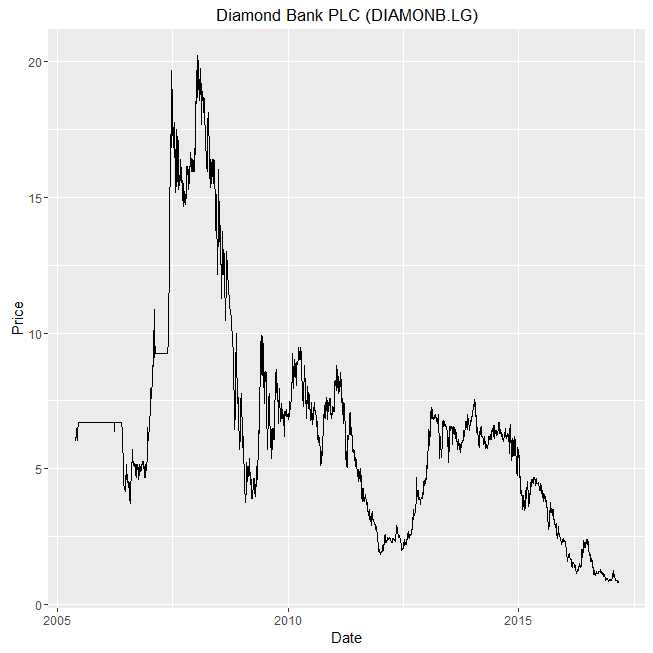
Today I decided to do an interesting analysis using R. I compiled actual/live data from as far as 1998 on Nigerian All Share Index and 48 of the most valuable stocks. You can access the raw data here: https://drive.google.com/open?id=0B4XKk-Dstn-eVjRMQ0hQR0hvQ3c

Here is the R code text.


# Load in necessary libraries
require(ggplot2)
require(lubridate)

nse_asi<- csv="" data_analysis="" font="" read.csv="">
nse_asi$Date<- ate="" font="" mdy="" nse_asi="">

# Uncomment the following lines to see the structure and preview of the raw data
#str(nse_asi)
#summary(nse_asi)
#head(nse_asi)


# This next lines of code are to generate the charts for each company in a separate window
# It is not compulsory, and might be worth commenting out if it makes your computer freeze
for (cmpy in unique(nse_asi$Company)){
  dev.new()
  print(ggplot(data=nse_asi[nse_asi$Company==cmpy,], aes(x=Date, y=Last_Price))+
  geom_line() +
  ggtitle(cmpy) +
  labs(x="Date",y="Price") )
}

# This is the most important chart code. Generates the charts in a neatly grouped way
ggplot(data=nse_asi, aes(x=Date, y=Last_Price, group=Ticker, color=Ticker))+
  geom_line() +
  facet_wrap(~Ticker,scales="free") +
  labs(x="Date",y="Price") +
  theme(legend.position="none")


And below are the results. Enjoy. Lots of screenshots. And make sure you notice the interesting insights: like how investors in Presco, Okomu Oil, United Capitals and Mobil would have been smiling to the bank despite the market depression and economic recession. I personally made some gain from Mobil. Also notice how not very long ago, 1 USD exchanged for 22 Naira.

NSE ASI (pointed out with the red line) and 48 top stocks

FGN 10 Year Bond Yield

Nigeria Real GDP Growth from 1960 till Today

US Dollar to Nigerian Naira Exchange rate